Frequently Asked Questions
Cyclone Manual - Frequently Asked Questions
Cyclone can’t find an executable
Cyclone calls the executable specified in the settings. If the executable name does not include its full path, the directory containing the executable must be included in either the User PATH or the System PATH environment variable.
To add an executable directory to the PATH:
-
Open Environment Variables (for the current user or for the whole system).
-
Edit the Path variable.
-
Add the full path to the directory containing the executable.
-
Restart Cyclone.
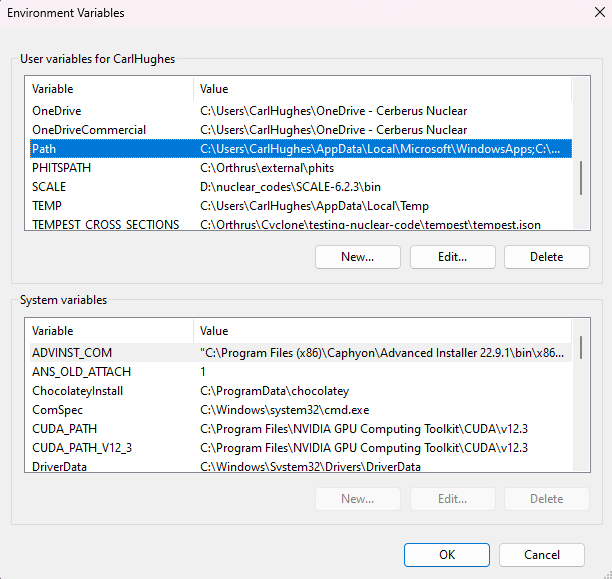
Figure 107 Environment settings
Table 9 Summary of steps to fix can’t find executable
| Setting | Description |
|---|---|
| Executable | The command or file Cyclone calls to run (e.g., mcnp.exe). |
| Full Path (optional) | Full path to the executable (e.g., C:\Program Files\MCNP\mcnp.exe). |
| User PATH variable | Environment variable that applies to the current user. |
| System PATH variable | Environment variable that applies to all users on the system. |
| Required Action | Add the executable’s folder to one of the PATH variables if full path is not provided. |
The build is taking a long time
The time required to build a model depends on its complexity and whether it contains lattices.
-
A large input made up of simple boxes will build quickly.
-
A large input with spheres or cylinders will take longer.
-
Resolution has a significant impact: for example, a resolution of 4 builds much faster than a resolution of 60.
-
Lattices further increase build time, especially when nested lattices are used.
Recommendations
-
When defining a lattice, always specify the lattice indexing range instead of leaving it infinite. If no range is given, Cyclone must compute the boundaries automatically, which increases build time.
-
For complex cases, particularly with lattices, it is often better to disable CAD lattice building in the settings and use the raytracer instead.
-
For very large models (e.g., reactor-scale models), running in raytracer-only mode may provide the fastest way to inspect geometry.
-
Hardware performance also plays a role: the build process is multi-core, so larger CPUs will significantly reduce build times.
-
Builds can be cancelled at any time, allowing resolution to be adjusted or other settings before restarting.
What versions of MCNP are supported
Cyclone officially supports MCNP Version 6. Only MCNP Version 6 is officially supported; use of earlier versions is at the user’s discretion. Cyclone requires only the location of the MCNP executable (see Section 7.3), which may point to a version earlier than 6. If an earlier version is used, care should be taken to verify that Cyclone has executed MCNP correctly.
When should you build a full lattice and when should you use raytracer only mode
As described throughout, the Cyclone CAD processor can generate CAD models for all geometry. However, as noted in Appendix 3.2, model construction can be time-consuming, particularly when lattices are involved. In general, building a single lattice does not present a problem. For nested lattices, however, CAD lattice generation should be disabled unless the geometry is known to be simple and cuboidal.
For instance, in a full reactor model containing many nested lattices, CAD model generation should be turned off. Instead, the raytracer (see Section 16.2.5) should be used to examine the model in detail. A good example is the BEAVRS criticality benchmark model, which has been built successfully by disabling lattice generation and relying on the raytracer to visualise the missing details.
Raytracer-only mode should be considered a last resort, reserved for the most complex models with extensive geometry outside of lattices. Such cases are expected to be very rare.
2D Slice Display Errors
At times, Cyclone may appear to report an error in the model. While this can indicate a genuine issue, the most common cause occurs when a 2D slice coincides with a shared boundary. For example, if one box ends at plane z = 10 and another begins at z = 10, this represents valid geometry. However, when a slice is taken exactly at z = 10, Cyclone cannot determine which side takes precedence. In such cases, it attempts to draw both objects on the same slice, which may be displayed as an error.
To confirm this situation, adjust the slice position slightly (e.g. to z = 10.00000001 or z = 9.999999999). If the error disappears, the geometry is valid, and the issue arises only from the shared boundary at the slice location.
HTML1Keywords are not 2case-sensitive.
HTML1When working with 2lattices, if the full lattice has not been built by the CAD 3processor, only the lattice at index (0, 0, 0) will be exported.
HTML1Colour schemes can 2only be applied to particle track files that track energy. This 3mainly affects binary and ascii particle track files.