Running MCNP with Cyclone

Cyclone Manual - Running MCNP with Cyclone

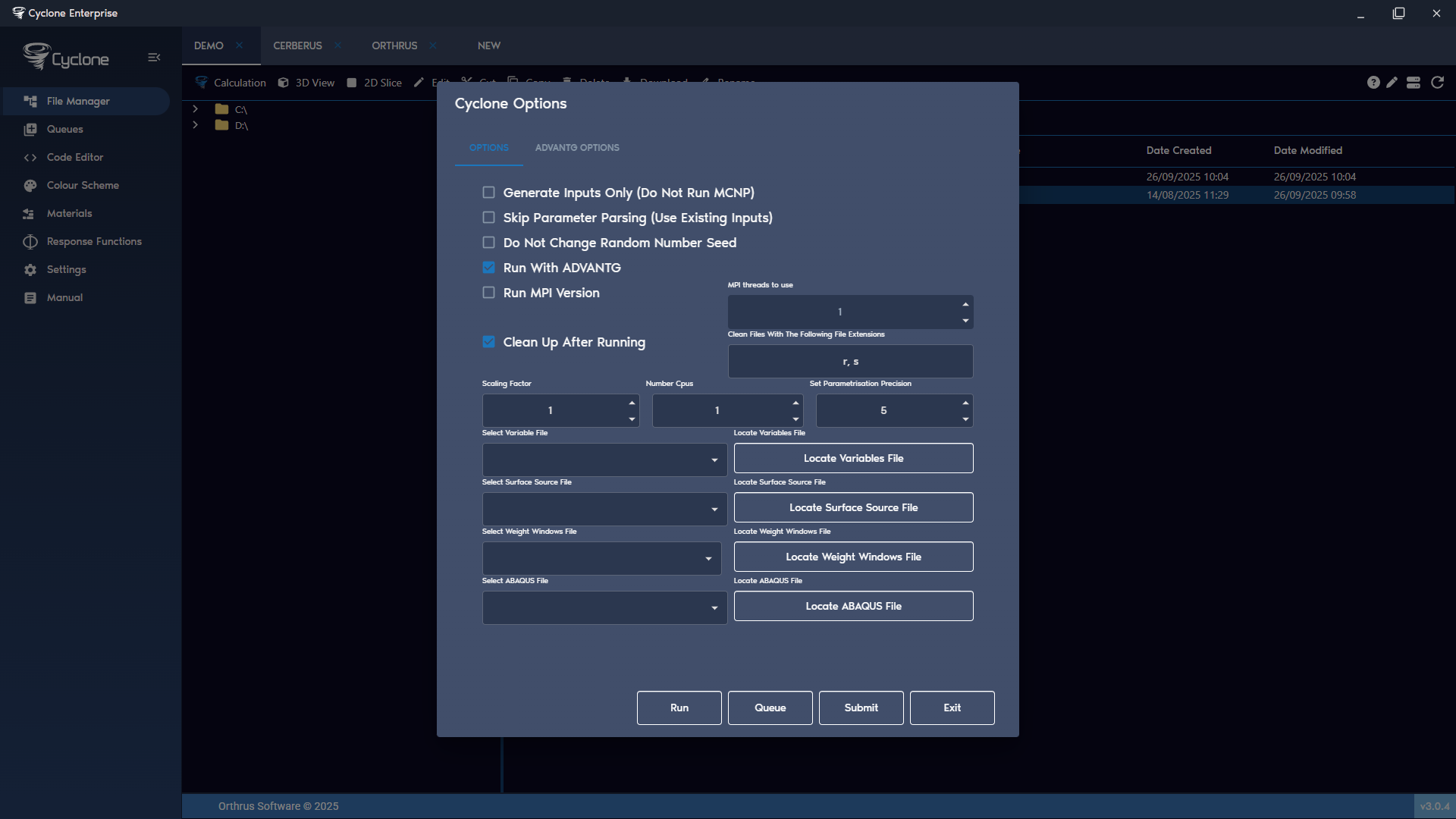
Cyclone runs each case using MCNP. The MCNP output is processed with EddyMC [2], which collects tally and keff results into a CSV file (with parameters), checks for errors, removes unnecessary files and renames any old run files. Figure 7 shows the full list of options available.

Cyclone Process Flow

There are two main flows in Cyclone, a set of parameter cases or a single MCNP case. The process flow is shown in Figure 8.

Options

The following are the main options available in a calculation run.

Generate Inputs Only (Do Not Run MCNP)

This will generate all inputs without running them with MCNP. The main purpose of this feature is to check the generated inputs when using parametrisation. Default: off.

Skip Parameter Parsing (Use Existing Inputs)

This feature allows the user to rerun a pre-generated parameter case without re-applying the parameterisation logic. When Cyclone processes a parameterised case, it generates new input files that all still contain the instructions and methods used to create them. Normally, if these files are processed again, Cyclone detects the parameterisation logic and attempts to regenerate inputs. Enabling this option prevents that behaviour, ensuring the case is simply rerun as-is, without creating new inputs. Default: off.

Do Not Change Random Number Seed

By default, when Cyclone runs an MCNP case, the starting seed on the RAND card is automatically changed by randomly picking an integer value between 1 and 1×10¹¹. This prevents MCNP from using the same random seed across different runs. If it is necessary to rerun a parameterised case or an existing input with the original seed preserved, this option should be enabled. Default: off.

Run With ADVANTG

Check this box to run the input case with ADVANTG and MCNP. ADVANTG is used to generate weight windows for the problem input. For full details on how to run with ADVANTG refer to Section 9. Default: off.

Run MPI Version

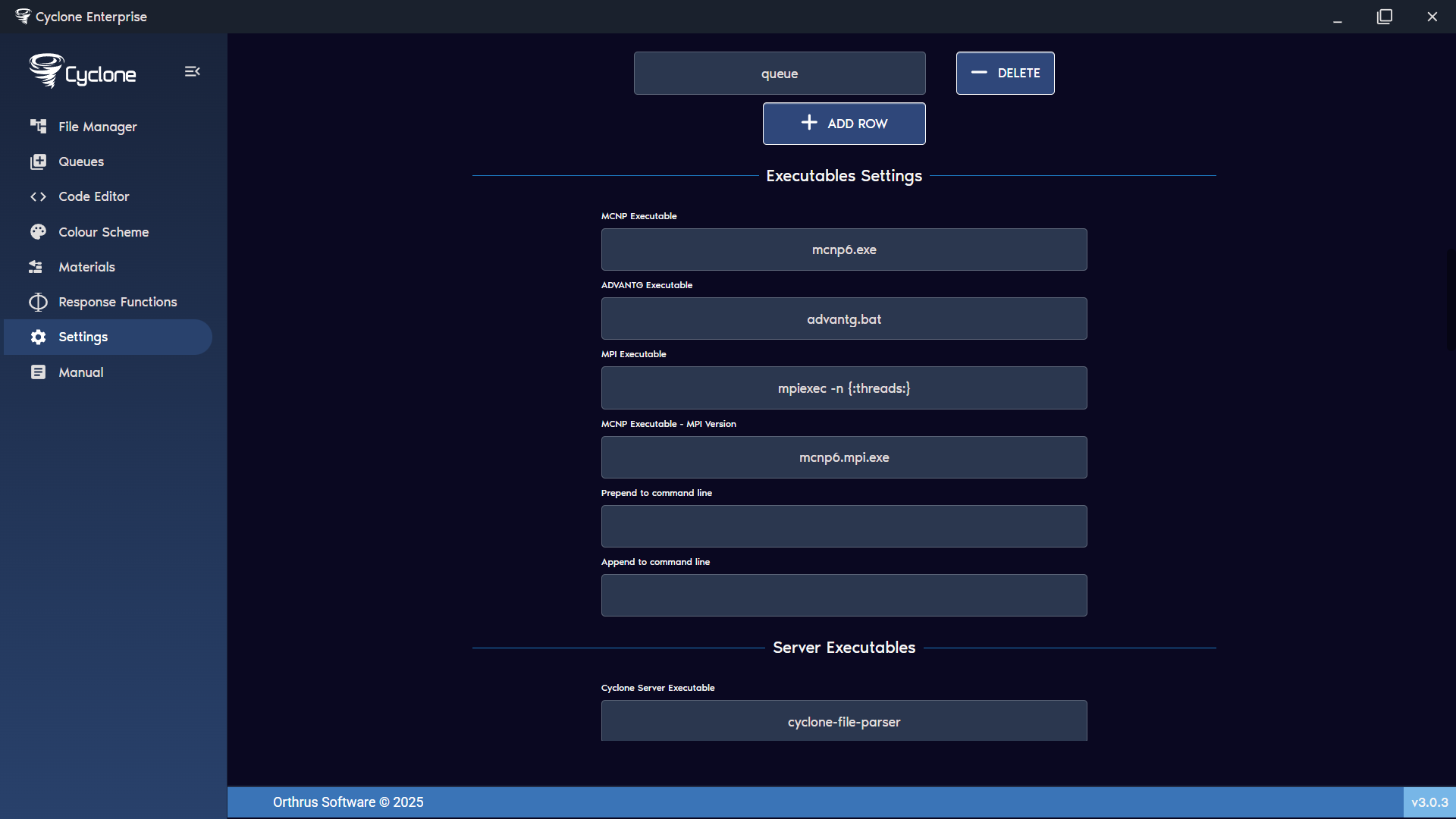
Check this box to run the MPI version of MCNP. The MPI executable can be changed in the settings along with the MCNP MPI executable. See Figure 9. Default: off.

Clean Up After Running

Cyclone can automatically remove files generated by MCNP which are not required by the user. The user can specify a list of file extensions, separated by commas. For example, entering:

Plain text
1“s, r”

will delete any files ending in “.s” or “.r”. This option should be used only if necessary. Default: on.

Scaling Factor

MCNP Tally Results can be scaled by a user-specified scaling factor after the MCNP run is complete. The scaling factor is applied to the EddyMC output and the CSV results, but the original MCNP output file remains unchanged. Default: 1.

Number Cpus

The number of CPUs that MCNP uses on can be changed here. Default: 1.

Set Parametrisation Precision

By default, parameterisation values are set to 5 decimal places of precision. This default can be changed here. Default: 5.

Locate Variables File

Instead of defining all parameters in the MCNP input, a list of parameters can be created in a CSV file. This option allows the user to load the CSV file. See Section 12.13.

Locate Surface Source File

This option allows the user to locate a surface source file, if required by the MCNP case.

Locate Weight Windows File

This option allows the user to locate a weight windows file, if required by the MCNP case.

Locate ABAQUS File

This option allows the user to locate an ABAQUS file, if required by the MCNP case.

Run, Queue and Submit

Cyclone has several execution options. Users can choose to run Cyclone immediately (Run), queue the case locally (Queue), or submit it to an external queue system (Submit) (Enterprise Plan only).

Output Window

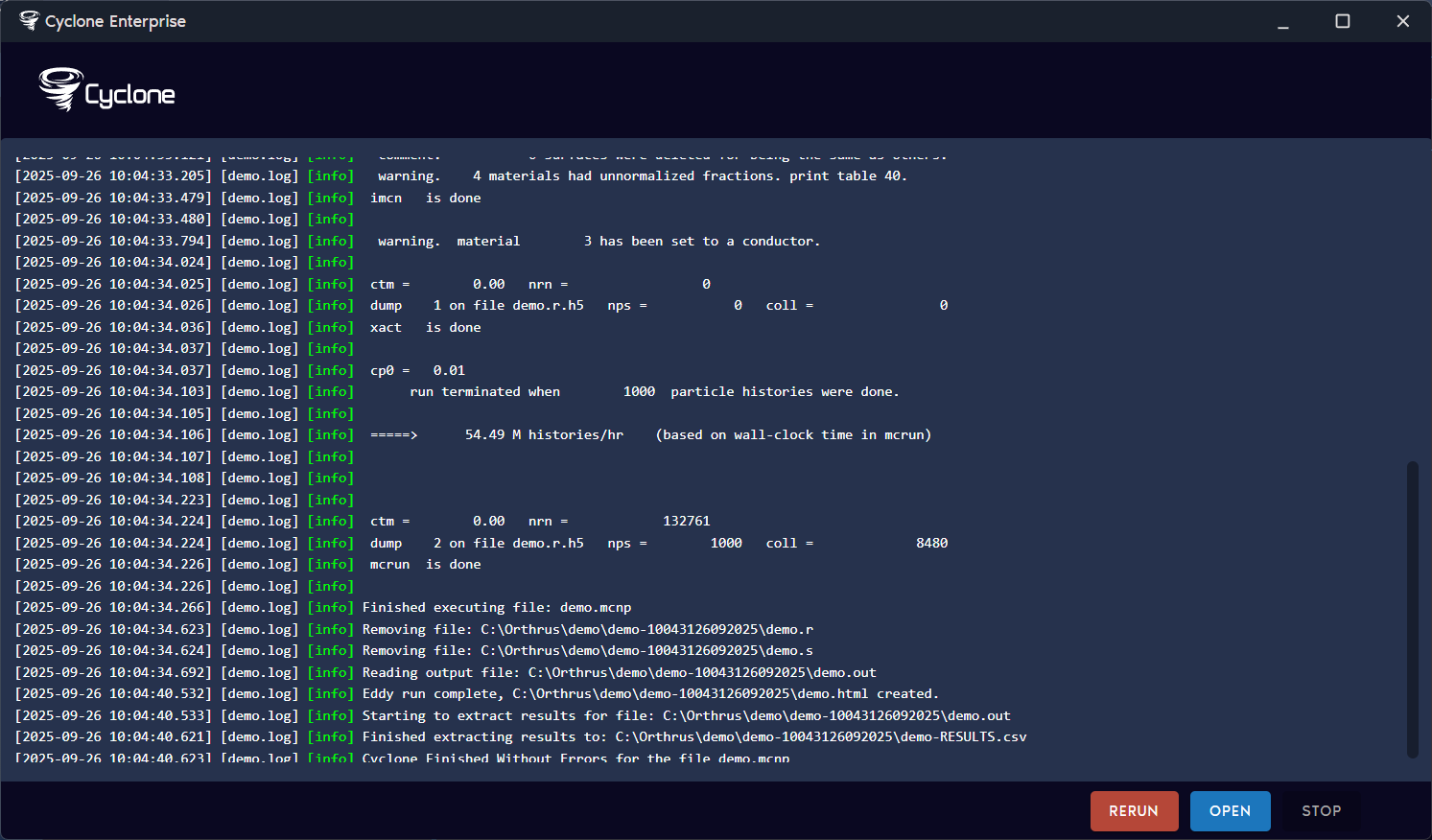
When running Cyclone immediately (Run), a window will appear showing Cyclone executing MCNP in real time. It displays progress, errors, warnings and a full run log. Once finished, the user can choose to rerun the case or open it in File Manager. While the run is in progress, the user can stop it at any time, which will terminate the MCNP process and exit early. See Figure 10.
Queue System

Cyclone includes a basic built-in Queue System that runs MCNP cases in the background on a first-in, first-out basis. It can also allocate jobs based on the number of CPUs. For more details, see Section 10.1.

Submission (Enterprise Plan)

Cyclone can submit to an external Queue System. For more details, see Section 10.2.

A screenshot of a computer AI-generated content may be incorrect.

Figure 7: Cyclone options Figure 8: MCNP process flow for single and parametrised cases

A screenshot of a computer AI-generated content may be incorrect.

Figure 9: MCNP MPI and MPI executable settings

A screenshot of a computer AI-generated content may be incorrect.

Figure 10: Cyclone output window

On this page
0 of 19