Parameterisation
Cyclone Manual - Parameterisation
Cyclone has the capability to evaluate user-defined parameters and generate multiple MCNP files from a single parameterised MCNP input. The user can view the evaluated parameters in the rendering view and select which parameters to display.
First Order Parameters
To define a variable, the user uses curly braces in a comment line within the MCNP input.
Plain text1c { var1 = 1 }
Complex variables can span multiple lines, provided there is a starting comment card on each line.
Plain text1c { var1 2c = 3c 1 }
To use a parameter in the MCNP input, substitute the variable name enclosed by curly braces (cannot be used in a comment card).
Plain text11 PX {var1} 22 RPP -{var1} {var1} -50 50 {var2} {var3}
Mathematical operations can be performed when defining a variable, or in the evaluation of the variable at substitution time, for example.
Plain text11 PX {var1 + sin(1.25)}
Range Parameters
A range variable can be defined in several ways, with the most common method using commas, for instance.
Plain text1c { var1 = 1.0, 2.0, 3.0, 4.0 }
A second way to define a range is with colons, where the first value is the starting value, the second value is the stop-before value, and the third value is the increment value.
Plain text1c { var1 = 1 : 10 : 2 }
This is the equivalent of:
Plain text1c { var1 = 1, 3, 5, 7, 9 }
When more than one range is present, Cyclone will create files for every possible variable combination, for example.
Plain text1c { var1 = 10.0, 20.0, 30.0 } 2c { var2 = 40.0, 50.0, 60.0 }
This will generate the following files with var1 and var2 expanded as follows:
Plain text1Input 1: var1=10, var2=40 2Input 2: var1=10, var2=50 3Input 3: var1=10, var2=60 4Input 4: var1=20, var2=40 5Input 5: var1=20, var2=50 6Input 6: var1=20, var2=60 7Input 7: var1=30, var2=40 8Input 8: var1=30, var2=50 9Input 9: var1=30, var2=60
Sometimes it is not desirable to generate inputs for every possible combination; instead, it is desirable to step through variable ranges one at a time. To instruct Cyclone to step through a range, use $ to separate the values, instead of using a comma.
Plain text1c { var1 = 10.0$ 20.0$ 30.0 } 2c { var2 = 40.0$ 50.0$ 60.0 } 3c { var3 = 70.0$ 80.0$ 90.0 }
Will generate the following input files:
Plain text1Input 1: var1=10, var2=40, var3=70 2Input 2: var1=20, var2=50, var3=80 3Input 3: var1=30, var2=60, var3=90
Currently, range parameters are limited to “first order”; that is, they cannot contain another variable.
For example, the following usage is not permitted:
Plain text1c { var1 = var2, var3, var4, var5 }
Preprocessors
Cyclone provides a basic preprocessor that can handle if-else statements. These preprocessors must appear at the beginning of a line and cannot be placed behind a comment sign. The preprocessors are defined as follows:
Plain text1|IF {variable} {expressions} {expression answer} 2|ELSE IF {variable} {expressions} {expression answer} or 3|ELIF {variable} {expressions} {expression answer} 4|ELSE 5|ENDIF
For example:
Plain text1|IF var1 == 8 21 px 8 3|ELSE IF var1 == 9 41 px 9 5|ELSE IF var1 == 10, 11, 12 #eg var1 is either 10, 11 or 12 61 px 10 7|ELSE IF var1 > 12 81 px 15 9|ELSE 101 px 7 11|ENDIF
There is no limit to the number of lines that can be used within the if-else blocks; the only limitation is that variables cannot be defined within these blocks.
Expressions
Expressions can be simple:
Plain text1c { var1 = 1 }
Or they can be complex ternary operations:
Plain text1c { var2 = var1 > 10 ? 25 : 5 }
Multiple nested ternary operations are also possible:
Plain text1c { var3 = var2 > 10 ? 25 : var1 < 10 ? 15 : 5 }
The more complicated the function becomes, the harder it is to read, so it is advisable to use multi-line inputs.
In-Operator
The '==' operator can also be used to check if a variable is equal to a value in an array, for example:
Plain text1var1 == 1, 2, 3, 40, 50, 60
This would return true if var1 is one of the values; otherwise, it would return false. The in-operator can be used in the preprocessors or ternary statements.
The user cannot use a range variable to compare against, however other variables can be used.
This is allowed:
Plain text1var1 == var2, var3, 40, 50, 60
This is NOT allowed:
Plain text1{var2 = 1, 2, 3, 40, 50, 60} 2var1 == var2
Random and Seed Values
Random and Seed variables can be used. To define a random variable, the user can either use random(upper) to produce a random number between 0 and the upper value, or they can use randint(lower, upper) to generate a random integer between lower and upper. By default, the seed is set to an integer value. If the user needs to set the seed value to replicate runs, they can set the seed via:
Plain text1c { seed = 123456 }
The seed value used is printed in the MCNP outputs.
Naming Convention
It is strongly recommended to use a sensible name when creating parameters that are easy to understand in the context of any MCNP input. The user should not use numbers in naming variables, and a name that matches any of the available mathematical functions cannot be used; doing so will result in a parameterisation error.
CSV Parameter File
For large and complex models with many parameters, the input can become difficult to manage. To simplify this, a CSV file can be supplied containing a list of all required first-order parameters. The first line of the CSV file defines the variable names, and each subsequent line specifies a new input, with the variables read from that line.
Plain text1var1, var2, var3, var4, var5, var6 21,2,3,4,5,6 37,8,9,10,11,12 413,14,15,16,17,18 519,20,21,22,23,24
This produces 4 inputs where the values of variables 1-6 change for each input.
Parameters used internally to Cyclone
Cyclone has a list of parameters that are used internally and can be added to executable commands or the queue template used with the remote server, see Table 4 for a full list of parameters. Appendix 1 shows how to use them in the remote server template.
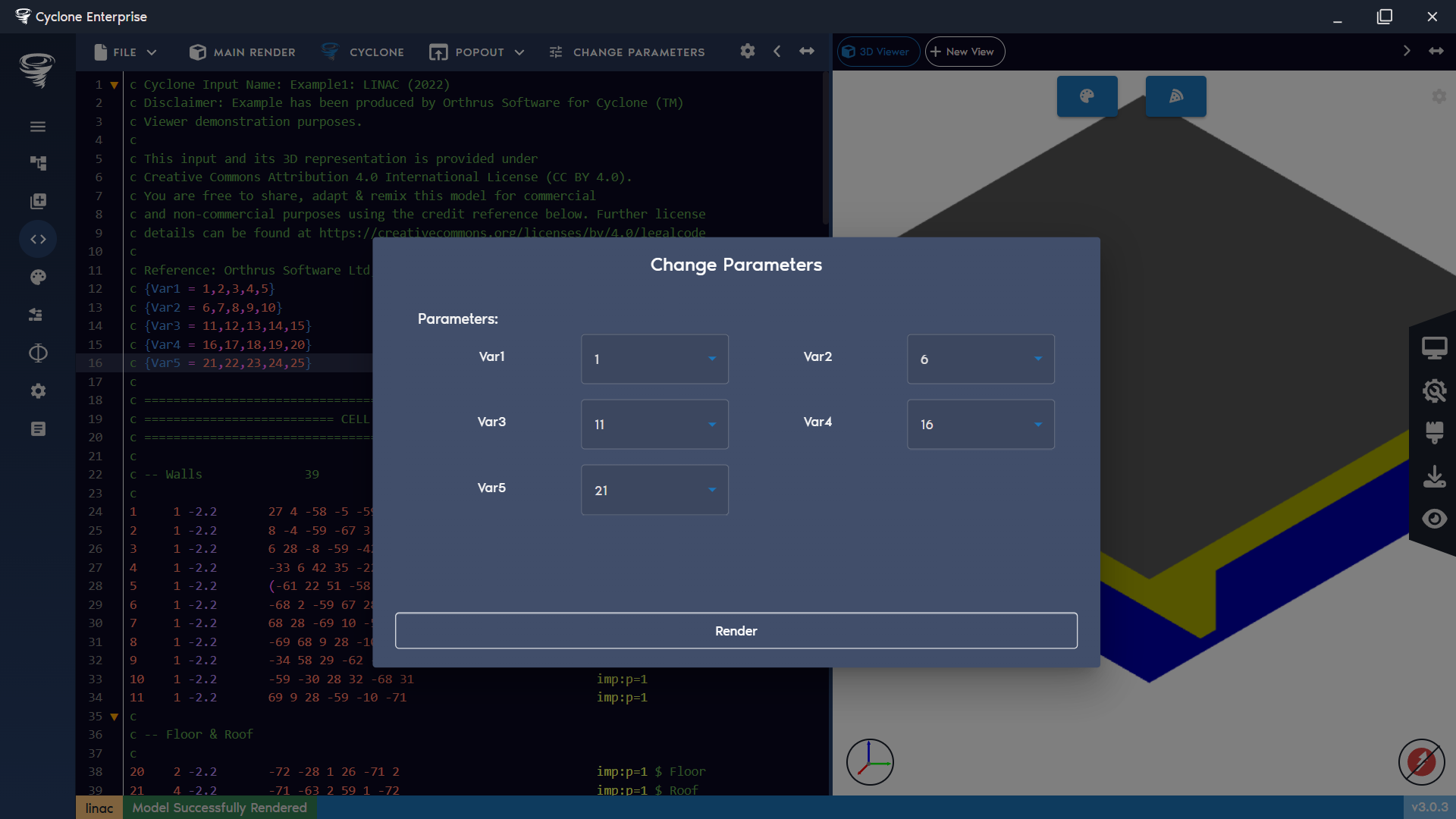
Figure 30: Change view parameters
Table 1: Boolean Logic | Logic | Evaluation | |-------|----------------------------------------------------------| | == | Checks if two arguments are the same | | >= | Checks if the first argument is equal to or greater than | | <= | Checks if the first argument is equal to or less than | | > | Checks if the first argument is equal to or less than | | < | Checks if the first argument is less than |
Table 2: Math Symbols | Symbol | Details | Symbol | Details | |--------|------------------------------|---------|---------------------------| | + | Addition | - | Subtraction | | * | Multiplication | / | Division | | ^ | To the power of | % | Modulus | | () | Parenthesis | & | And | | | | Or | = | Equals | | > | Greater than | < | Less than | | >= | Greater than or equal to | <= | Less than or equal to |
Table 3: Available Math Functions
| Symbol | Description |
|---|---|
| abs(x) | Absolute value of x. |
| acos(x) | Arc cosine of x (radians). |
| and(a, b) | Logical AND (non-zero = true). |
| asin(x) | Arc sine of x (radians). |
| atan(x) | Arc tangent of x (radians). |
| atan2(y, x) | Arc tangent of y/x, considering quadrant. |
| average(x₁, x₂, …) | Arithmetic mean of arguments. |
| ceil(x) | Smallest integer ≥ x. |
| clamp(x, min, max) | Restricts x to [min, max]. |
| cos(x) | Cosine of x (radians). |
| cosh(x) | Hyperbolic cosine of x. |
| cot(x) | Cotangent of x (1 / tan(x)). |
| e | Euler’s number ≈ 2.718281828. |
| exp(x) | e raised to the power x. |
| fac(x) / fact(x) | Factorial of x (x!). |
| floor(x) | Largest integer ≤ x. |
| if(cond, a, b) | Returns a if cond ≠ 0, else b. |
| ln(x) | Natural logarithm (log base e). |
| log(x) / log10(x) | Base-10 logarithm. |
| max(a, b, …) | Maximum of arguments. |
| min(a, b, …) | Minimum of arguments. |
| mod(a, b) | Modulus (remainder of a / b). |
| not(x) | Logical NOT (1 if x = 0, else 0). |
| or(a, b) | Logical OR (non-zero = true). |
| permut(n, r) | Permutations of n items taken r at a time (n! / (n−r)!). |
| pi | π ≈ 3.141592653589793. |
| pow(x, y) / power(x, y) | x raised to the power y. |
| rand(x) | Random float in [0, x]. |
| randint(a, b) | Random integer in [a, b]. |
| random(x) | Alias for rand(). |
| round(x) | Nearest integer to x. |
| seed(x) | Sets RNG seed to x. |
| sign(x) | Returns -1, 0, or 1 depending on sign of x. |
| sin(x) | Sine of x (radians). |
| sinh(x) | Hyperbolic sine of x. |
| sqr(x) | Square of x. |
| sqrt(x) | Square root of x. |
| sum(x₁, x₂, …) | Sum of all arguments. |
| tan(x) | Tangent of x (radians). |
| tanh(x) | Hyperbolic tangent of x. |
| trunc(x) | Truncate fractional part toward zero. |
| uniform(a, b) | Random float uniformly distributed in [a, b]. |
Table 4: Cyclone Backend Symbols
| Placeholder | Value Substituted |
|---|---|
| {:start:} | start index for array job range |
| {:end:} | end index for array job range |
| {:cwd:} | new run folder path |
| {:stem:} | Base name of input file without extension |
| {:directory:} | Timestamped folder name |
| {:input-file:} | JSON input file name (used to define a cyclone case) |
| {:mcnp-file:} | MCNP input file name |
| {:cyclone-path:} | Path to Cyclone server executable |
| {:cyclone:} | Cyclone server executable name |
| {:cpus:} | Number of CPUs |
| {:queue:} | Name of queue |
| {:queue-file:} | Queue file |
| {:array:} | Array specifier with {:start:}/{:end:} substituted |
| {:threads:} | Number of threads used with MPI case |