Running MCNP and ADVANTG with Cyclone
Cyclone Manual - Running MCNP and ADVANTG with Cyclone
Cyclone can execute ADVANTG [3], prior to running MCNP, to generate weight windows for use in the MCNP run. Enabling the ADVANTG option in the main settings will display an additional menu. See Figure 11.
Cyclone Process Flow with ADVANTG
The Cyclone workflow with ADVANTG follows the same sequence as the standard MCNP-only workflow, with an additional step that generates and runs an ADVANTG input file prior to MCNP execution. The resulting weight window file is validated and placed in the same directory as the MCNP input file. During this process, the MCNP input is automatically updated to include source biasing and weight window parameters. After ADVANTG completes, any temporary files and folders are deleted, and execution continues with the MCNP run. This workflow applies to both single MCNP cases and parameterised runs (see Figure 12).
ADVANTG Options
ADVANTG has many execution options and parameters which can be specified in the main Cyclone interface. For a full description of each option, refer to the ADVANTG manual [3]. Some commonly used options are:
-
Version – Choose between 3.0 and 3.2. This affects which options are available, so the user should ensure they select the version that matches their installation.
-
Variance Reduction Method – Select from cadis, fwcadis or dx.
-
ADVANTG Target Tallies – Leave blank to target all tallies in the MCNP input or specify a list to limit the target tallies.
Mesh Specification
The only ADVANTG option that is not available through the main Cyclone interface is the ability to define a MESH. Instead, this must be specified in the MCNP input file. For example:
Plain text1c CYCLONE ADVANTG MESH START 2c XMESH -788 -588 -381 -164 140 178 338 528 588 788 END 3c XINT 2 25 2 25 2 25 2 25 2 END 4c YMESH -800 -298 -213 523 600 800 END 5c YINT 2 25 2 25 2 END 6c ZMESH -50 350 END 7c ZINT 50 END 8c CYCLONE ADVANTG MESH FINISH
To ensure correct operation with MCNP, each line must be commented out using the standard MCNP comment character c. This prevents the Cyclone-specific data from being interpreted by MCNP. Each block must begin and end with clearly defined markers, as shown above.
Cyclone searches for the following keywords in the input file[^1]:
-
CYCLONE ADVANTG MESH START
-
CYCLONE ADVANTG MESH FINISH
-
XMESH
-
XINT
-
YMESH
-
YINT
-
ZMESH
-
ZINT
-
END
Defining the mesh in the MCNP input also allows parameters to be used where needed.
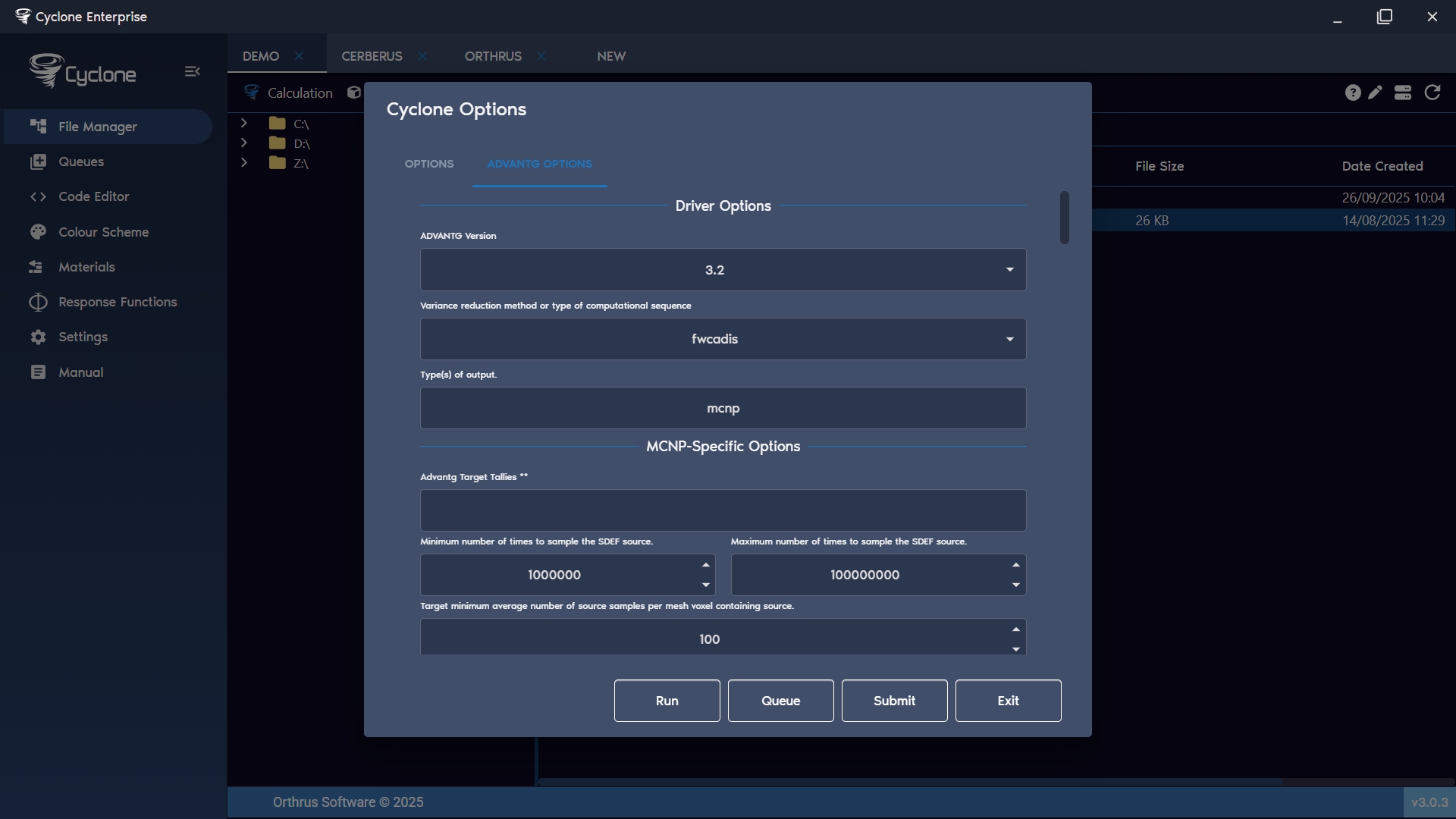
Figure 11: ADVANTG options Figure 12: Cyclone MCNP and ADVANTG process flow